
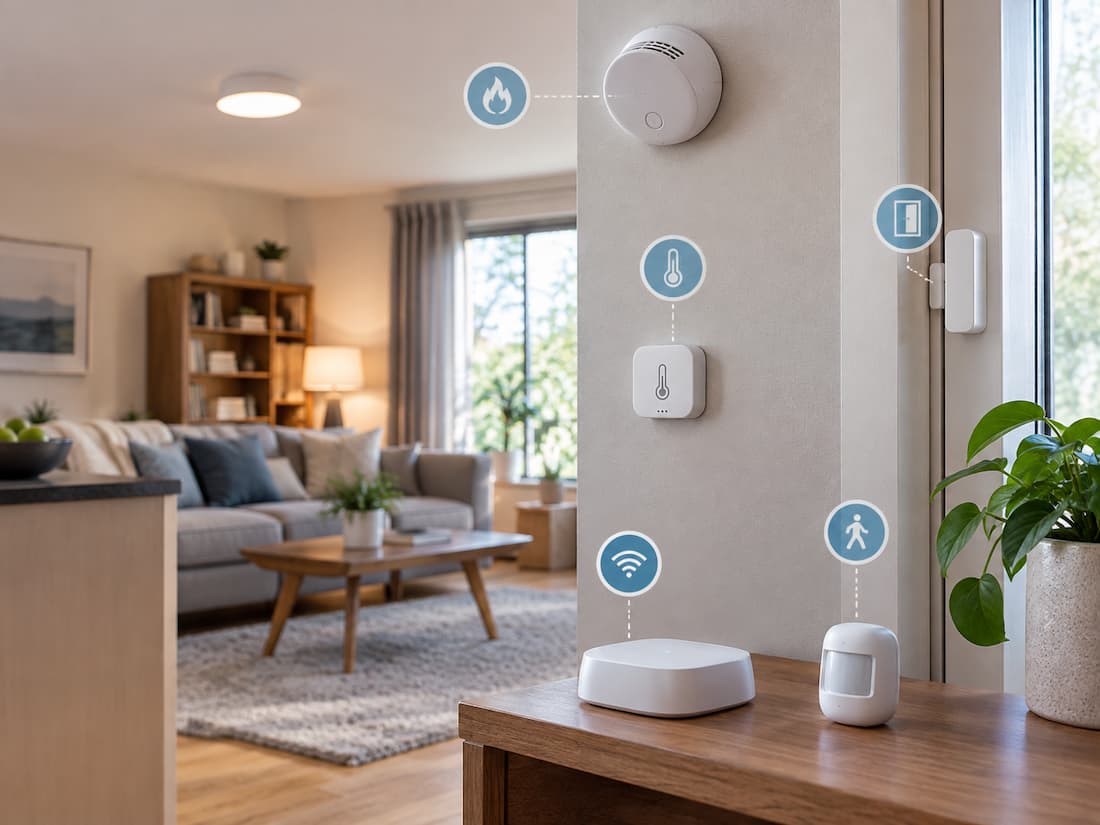
A smart light can switch on by itself, but it needs some way to know when someone has entered the room. A smart thermostat can adjust the temperature, but it needs information about the environment before it can respond. A water-leak alert is only useful if something can detect the water in the first place. That is the less visible side of a smart home: sensors.
Sensors give connected devices information about what is happening around them. Some notice movement. Others measure temperature, detect an open door, sense water, or monitor changes in indoor air conditions. Once that information reaches a compatible smart home system, it can be used to trigger an action or simply inform the homeowner about a change.
The important part is that different sensors are built to notice different things. Understanding those differences makes it much easier to decide where sensors are actually useful and where they may add unnecessary complexity.
Think of sensors as the home’s “eyes and ears”.
Smart home devices are often divided into two broad groups. There are devices that detect something, and there are devices that do something. A sensor usually belongs to the first group. Imagine walking into a dark hallway. A motion sensor notices movement. The smart home system receives that information, and a smart light responds by turning on. The sensor did not necessarily turn on the light itself. It supplied the information that made the action possible.
The same idea applies to many other situations:
- A contact sensor reports that a window has opened.
- A temperature sensor reports that a room has become warmer.
- A humidity sensor notices a change in moisture in the air.
- A water sensor detects water at its sensing point.
- A light sensor measures how bright an area is.
- A presence-orientated sensor may detect that someone remains in a room.
This distinction is useful because it changes the way you think about buying smart devices. Instead of asking, “What smart gadget should I buy?” a better question is often, “What do I want my home to notice?”
Movement Is Only One Thing a Sensor Can Detect
Motion sensors are probably the first type that comes to mind when people hear the word “sensor”. Many common motion sensors use passive infrared, or PIR, technology. They detect changes in infrared energy associated with movement. That makes them useful for simple situations.
A hallway light can turn on when someone walks past. A storage room light can activate when somebody enters. A smart home system can also use movement as one condition in an automation. But there is an important limitation: movement and presence are not the same thing. If someone walks into a room and then sits quietly, a traditional motion sensor may eventually stop detecting movement. The person is still present, but the sensor may not detect any new movement. This is why the type of sensor matters more than simply having “a sensor”.
When Presence Detection Makes More Sense
Presence-orientated sensors are intended to detect whether someone remains in an area, rather than relying only on obvious movement. This can be useful in rooms where people spend time sitting still. Consider a home office. Someone may enter, sit at a desk, and work for an hour with very little movement. An automation based entirely on motion detection may not interpret that situation in the same way as a system designed to detect continued presence.
Some presence sensors use technologies such as radar or other sensing methods. Their exact capabilities vary, so the label alone should not be treated as a guarantee of what a particular device can detect. This distinction can prevent a common mistake: using a basic motion sensor for a task that really requires more persistent information about occupancy.
A Door Sensor Answers a Much Simpler Question
Not every useful sensor needs complicated technology. A contact sensor normally consists of two parts positioned together when a door or window is closed. When the door or window opens, the two parts separate and the system detects the change.
Its job is simple:
Is this opening closed or open?
That makes contact sensors useful in situations where movement detection would be unnecessary. A contact sensor on a back door can notify you when the door opens. One on a window can report a change in its position. Similar sensors can be used on cabinets, drawers, refrigerators, or other objects where knowing whether something has opened is useful. There is also a practical advantage to this approach. The sensor does not need to know whether a person caused the change. It only needs to know that the two contact points are no longer in contact.
Temperature Tells You More Than “Hot or Cold”
Temperature sensors are straightforward, but their usefulness depends heavily on where they are placed. A sensor measures the temperature at its sensing location. That sounds obvious, yet it is deceptively simple to overlook. A sensor mounted directly beside a heating appliance may not represent the temperature in the rest of the room. One placed near a drafty window may also produce different readings from a sensor positioned farther inside the room.
This makes temperature sensors useful for monitoring specific spaces rather than assuming one reading represents the entire home. They can support climate-related automations, provide information about rooms that tend to become warmer or cooler, or simply help a homeowner understand how conditions change throughout the day. The sensor itself does not decide what “comfortable” means. The smart home system and the rules built around it determine what happens after it receives the measurement.
Humidity Adds Another Piece of the Picture
Temperature and humidity are often discussed together because they describe different aspects of indoor conditions. A bathroom, for example, can experience a rapid increase in humidity after a shower. A humidity sensor can detect that change and, when connected to compatible equipment, help trigger ventilation-related actions.
Humidity information can also be useful in other parts of a home where moisture levels matter. However, a humidity sensor should not be confused with a water-leak sensor. One measures moisture in the air. The other is designed to detect liquid water reaching its sensing area. Those are very different jobs.
Light Sensors Help Smart Lighting React to Conditions
A timer can tell a smart light to turn on at a particular time. A light sensor can tell the system how bright the surroundings actually are. That difference can make lighting automations more responsive.
For example, a room may still be bright enough in the late afternoon because sunlight is coming through the windows. A fixed schedule might turn on the lights anyway, while a system using light-level information can take the actual conditions into account. But light sensors have their own limitation: the sensor only knows what reaches the sensor.
If it is positioned directly beside a lamp, it may measure a very bright spot while the rest of the room remains dim. Direct sunlight can also change the reading substantially. Placement therefore becomes part of the sensor’s accuracy.
Water Sensors Are Small but Can Be Very Practical
Water-leak sensors are designed around a simple idea: detect water where water should not normally be.
They are commonly useful around places such as:
- Under sinks
- Near washing machines
- Around water heaters
- Near plumbing connections
- In areas where a leak could go unnoticed
The benefit is not that the sensor prevents a leak. It does not. Its value is that it can make an otherwise hidden problem noticeable. A leak under a cabinet may not be immediately visible from across the room. If water reaches a properly positioned sensor, the system can potentially alert the homeowner before the problem becomes obvious. Placement is particularly important here. A sensor cannot detect water that never reaches its sensing area.
Some Sensors Deal With Safety, Not Convenience
Smart homes also use sensors and connected alarms for conditions that have greater safety importance. Smoke alarms and carbon monoxide alarms are designed to detect potentially dangerous conditions. Connected versions may provide additional notifications or remote status information, depending on their design.
These devices should be treated differently from ordinary convenience sensors. A smart notification does not replace the basic safety function of a properly installed and maintained alarm. If a device is intended for life-safety use, its documentation, installation requirements, testing procedures, and maintenance instructions matter. Air-quality sensors are another category, but they serve a different purpose. Depending on the model, they may monitor things such as particulate matter or certain gases. There is no single measurement called “air quality” that tells you everything about indoor air. Different devices monitor different conditions.
The Best Sensor Depends on the Room
A sensor that makes sense in one part of a home may have little value somewhere else.
Here is a practical way to think about it.
| Location | Sensor Type | Useful For |
|---|---|---|
| Hallway | Motion or presence | Lighting and occupancy-related automations |
| Exterior door | Contact | Knowing when the door opens |
| Window | Contact | Monitoring open/closed state |
| Bathroom | Humidity | Tracking changes after showers |
| Under the sink | Water | Detecting unexpected water |
| Bedroom | Temperature | Monitoring room conditions |
| Living room | Presence or temperature | Comfort and room-related automations |
| Storage area | Motion or contact | Detecting activity or access |
The table is only a starting point. The layout of the home and the actual problem you want to solve should determine the final placement.
Sensors Become More Useful When They Work Together
One sensor can provide useful information. Several sensors can sometimes provide a clearer picture. Consider a simple example involving a front door. A contact sensor can tell the system that the door opened. A motion sensor inside the entryway can detect movement afterwards. A light sensor can provide information about whether the area is already bright. These are three different pieces of information. The smart home system could potentially use them together instead of reacting to any single event in isolation.
This scenario is where automation becomes more interesting. Rather than creating a rule that says:
“When the door opens, turn on the light.”
A more conditional system could consider whether the door opened, whether movement followed, and whether the area is already dark. The exact options depend on the devices and platform involved, but the principle is the same: better information can produce more appropriate automation.
A Sensor Can Be Correct and Still Give You the Wrong Result
This scenario sounds strange, but it happens. Suppose a temperature sensor is working perfectly. It measures 27°C at its location. If the sensor is sitting near a heat-producing appliance while the rest of the room is cooler, the reading may be accurate at the sensor but unhelpful for the purpose you had in mind.
The same problem can occur with other sensor types. A motion sensor may detect movement from an area you did not intend to monitor. A nearby lamp may affect a light sensor. A water sensor may be installed several feet away from the place where a leak is most likely to occur.
So there are two separate questions:
Is the sensor working correctly?
and
Is the sensor observing the right place?
Good smart home planning requires both answers to be yes.
Don’t Turn Every Event Into a Notification
A smart home can easily become noisy. If a motion sensor detects movement and sends a notification, the homeowner may quickly stop paying attention. The same can happen when doors, windows, lights, or other devices generate constant alerts. The solution is not necessarily more sensors. It may be better to have automation rules.
For example, a motion event during normal daytime activity may not need an alert at all. The same type of event in a specific context may be more meaningful. This is an important part of designing a useful system: not every piece of information deserves your immediate attention. Sensors should reduce uncertainty, not create a stream of notifications that requires constant checking.
What Happens When the Internet Goes Down?
This is worth checking before buying connected sensors. A smart sensor may communicate with a local hub, directly over a wireless network, or through cloud-based services. The exact architecture varies between products and platforms. As a result, two devices that appear similar on a product page may behave differently when the internet connection disappears. Some local automations may continue working because the necessary processing happens inside the home. Other features may depend on an internet connection or remote service. If an automation is important to you, check what the system requires for that particular function.
This is especially relevant for alerts and safety-related devices. Knowing whether an event can still be detected and acted upon during a network outage is more useful than simply knowing that a device is labelled “smart”.
Start With a Problem, Not a Shopping List
The easiest way to avoid unnecessary sensors is to identify a real problem first.
For example:
- Problem: The hallway lights are inconvenient to operate at night.
- Possible solution: Motion or presence detection connected to compatible lighting.
Or:
- Problem: A rarely visited utility area could develop a water leak without being noticed quickly.
- Possible solution: A water sensor positioned near the likely source of leakage.
Or:
- Problem: A bathroom fan is difficult to manage because humidity changes after showers.
- Possible solution: A humidity sensor connected to compatible ventilation controls.
This approach is more practical than buying a collection of sensors and trying to invent uses for them afterward.
A Few Questions to Ask Before Installing One
Before placing a sensor, consider the following:
1. What exactly am I trying to detect?
Be specific. “Something happening in the room” is too vague. Someone entering the room” or “water appearing under the sink” is much clearer.
2. Where will that condition occur?
The answer determines placement.
3. What should happen after detection?
A sensor may only need to record information, or it may trigger an automation or notification.
4. What could interfere with the reading?
Think about sunlight, heat sources, furniture, pets, steam, walls, or other physical conditions.
5. What happens if the network or hub stops working?
The answer can matter more for some automations than others.
6. Will the notification actually be useful?
If the answer is no, consider whether the event should trigger an alert at all.
These questions turn sensor installation from a gadget-buying exercise into a practical home improvement decision.
The Real Value of Sensors Is Information
Smart home sensors are not impressive because they contain complicated technology. Their usefulness comes from giving a connected system information that it did not have before. A door contact sensor provides an open-or-closed state. A motion sensor provides information about movement. A presence sensor can offer a different view of occupancy. Temperature and humidity sensors describe environmental conditions, while water sensors look for liquid where it should not be.
None of these devices can see everything. That limitation is important. A sensor provides information only about the condition it was designed to detect, from the location where it is installed, using the technology built into it. Once you understand that, choosing sensors becomes much easier.
Conclusion
A useful smart home does not require a sensor in every corner. It needs the right information in the right places. Start by identifying something you want the home to notice. Then choose a sensor designed to detect that particular condition. Think about its installation location, what might affect its readings, what should happen after detection, and whether the connected system depends on a hub or internet service.
Motion, presence, contact, temperature, humidity, light, and water sensors all solve different problems. Their value comes from matching those capabilities to real situations around the home. The best smart home sensor is therefore not necessarily the most advanced one. It is the one that gives you useful information about a problem you actually care about—and does so reliably enough to make the rest of your smart home more useful.
FAQs
1. Can a smart sensor control another device?
Occasionally. A sensor typically provides information, while a compatible smart home system uses that information to trigger another device. Whether this works depends on the compatibility between the sensor, controller or platform and the device being controlled.
2. Are presence sensors better than motion sensors?
They are designed for different purposes. Motion sensors are useful when movement itself is what matters. Presence-orientated sensors can be more suitable when the system needs information about someone remaining in a space with limited movement. The appropriate choice depends on the automation.
3. Where should a temperature sensor be placed?
It should be positioned where its reading represents the condition you actually want to monitor. Avoid locations that are unusually affected by direct sunlight, heating equipment, cooling vents, or other strong local influences unless those conditions are specifically what you want to measure.
4. Can a water sensor prevent flooding?
A typical water sensor detects water; it does not physically prevent a leak. Its main benefit is providing information that can lead to an alert or, with compatible equipment and automation, another response.
5. Do smart home sensors require a smart hub?
Not always. Some sensors communicate directly with compatible devices or platforms, while others are designed to work through a hub or controller. The required setup varies by device, communication technology, and smart home ecosystem.